Program your LEGO® SPIKE Prime robot with blocks
Snap blocks together, see the Python they make, and run it on your hub. MatPilot is free, runs in your browser, and needs no account. It is made for classrooms and robot competitions.
Start with blocksRead the Docs
Get started in four steps
A computer
With Chrome or Edge, on Windows, macOS, ChromeOS or Android. iPads, iPhones and Firefox cannot connect to a hub.
Pybricks on the hub
Once, with a USB cable: see below.
Connect
Turn the hub on, press Connect hub and choose your hub.
Blocks and Run
Snap blocks together and press Run. The hub does what they say.
Put Pybricks on your hub
MatPilot talks to hubs that run Pybricks, free firmware made by the Pybricks team. You put it on the hub once, with a USB cable; after that MatPilot connects over Bluetooth. Pybricks’ own installer does the work:
- Open the installer. On a computer with Chrome or Edge, go to code.pybricks.com, open its tools menu and choose Install Pybricks Firmware. It asks a few questions first: the hub (SPIKE Prime), the licences, and a name for the hub.
- Get the hub ready. Turn the hub off and unplug its USB cable.
- Hold the Bluetooth button on the hub, and keep holding it.
- Plug in the USB cable (micro-USB) between the hub and the computer.
- Wait for the light. When the Bluetooth light blinks pink, green, blue, let go of the button.
- Choose the hub. In the browser’s pop-up, choose “LEGO Technic Large Hub in DFU Mode” and press Connect. Wait until the installer says it is done.
Open the Pybricks installerPybricks’ guide, with a video
- Linux needs a setting first (Pybricks on Linux); on Windows the installer may ask you to install a USB driver.
- Want the LEGO app back? The same tools menu has Restore official LEGO firmware, and it works the same way.
- MatPilot is tested with Pybricks v4.0.1. When you connect, it shows the version your hub has, and says so when it is another one.
The Blocks page
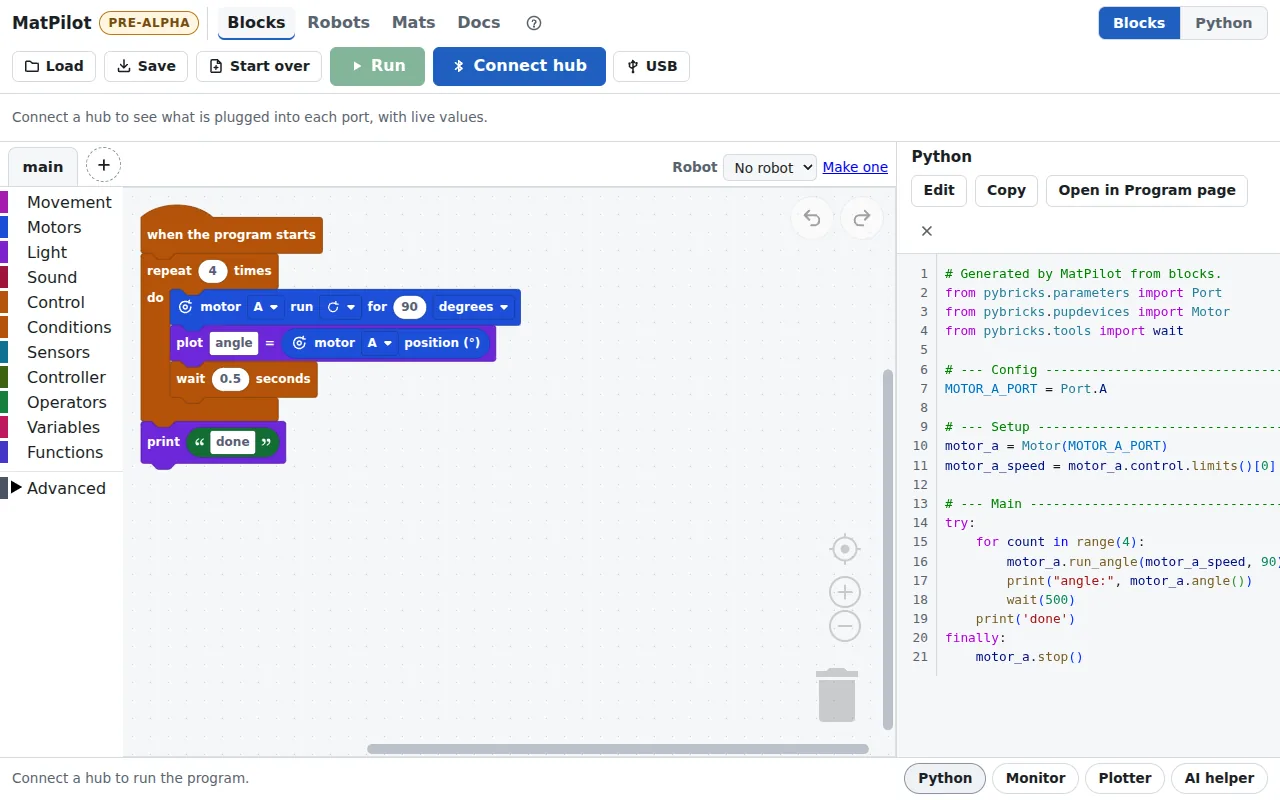
- Snap blocks together under “when the program starts” and press Run.
- Tap a block’s picture to choose a port, a turn, a speed or a light picture.
- Find blocks by colour on the left: Movement, Motors, Light, Sound, Control, Conditions (if, else and switch), Sensors and more.
- Python shows the code your blocks make. You can edit it too.
- Make blocks of your own in Functions, and keep them in tabs (+): each tab is a Python file that main uses.
- Undo (↶) takes back a change.
- Save and Load keep programs in a file, or in your team’s GitHub repository.
- Stop ends the program, and every motor stops with it. Leaving the page or disconnecting stops it too. If the Bluetooth connection drops, the program keeps running on the hub: press the hub’s centre button to stop it.
- The bar above the blocks shows what is plugged into each port while no program runs.
Robots and mats
Robots
Tell MatPilot about your robot: its wheels, its motors and sensors. Measure it, or make it from a LEGO® model built in BrickLink Studio.
Mats
Put a competition mat on the screen, place your robot on it, and try a program on the mat before the real run.
Docs
Every page explained, with pictures: for children, and for the grown-ups helping.
Built on Pybricks
MatPilot could not exist without Pybricks, free and open-source software for LEGO® hubs, made by Laurens Valk and David Lechner with contributors around the world. Pybricks does the hard parts; MatPilot adds blocks, robots and mats on top:
- The firmware on your hub is Pybricks. It runs every program and keeps the motors and sensors working.
- Connecting and running use the Pybricks protocol, the same way Pybricks’ own app talks to the hub.
- Every block makes Pybricks Python:
DriveBase,Motor,ColorSensorand the rest are Pybricks’ names. - Pybricks’ compiler turns that Python into the code the hub runs, right in your browser.
Pybricks is free for everyone, and it stays that way through its supporters. If MatPilot helps your team, please sponsor Pybricks on GitHub or on Patreon.
pybricks.comPybricks on GitHubSupport Pybricks
MatPilot is not made by the Pybricks team. Please ask about MatPilot on MatPilot’s GitHub, not them.
Check this computer and your hub
For grown-ups setting up. Write MicroPython yourself on Program & Monitor; testing with a real hub, the hardware test walks through each check and makes a report.
1. Device compatibility
Checking this browser…
2. Hub probe
Connects to a LEGO SPIKE Prime hub running Pybricks firmware and reads its name, firmware revision, and protocol version. Read-only: MatPilot does not write anything to the hub. Tested with Pybricks v4.0.1.
Connect to hub is available once the compatibility checks finish.
Turn on the hub, then click Connect to hub. The browser lists only nearby hubs running Pybricks firmware.